
An Android app could contain one or many activities. An activity has its own lifecycle and we can launch a new activity by using intents. In order to send data from an activity to another we could use a Bundle.
Activity
Activity lifecycle

- onCreate() :
- When: it is called when an activity is first created
- What: all the necessary UI elements should be initialized
- Is activity visible: not yet
- onStart():
- When: an activity becomes visible to the user
- What: code that maintains the UI, start async tasks (get data from API or database), register listeners
- Is activity visible: yes
- onResume():
- When: is called before the user starts interacting with the activity
- What: start animations
- Is activity visible: yes
- onPause():
- When: user is leaving the activity
- What: stop animations
- Is activity visible: partially invisible
- onStop():
- When: the activity is no longer visible to the user
- What: unregister listeners and all resources allocated in onStart()
- Is activity visible: no
- onRestart():
- When: the activity in the stopped state is about to start again (on back click)
- What: the cursor should be requeried
- Is activity visible: no
- onDestroy():
- When: the activity is destroyed from the memory
- What: should never be overridden
- Is activity visible: no
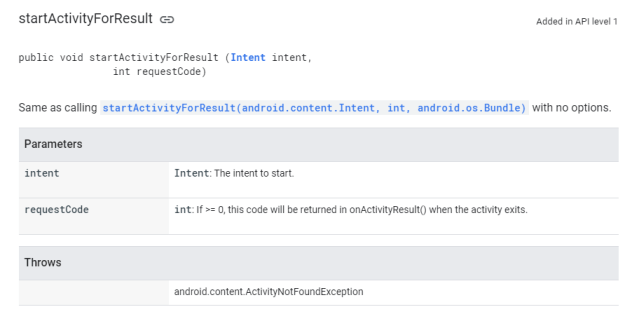
To get data back from a launched activity, start that activity with the startActivityForResult() method instead of startActivity().
Let’s say we have 2 activities: Activity1 and Activity2 and we want to validate the message sent from Activity1 to Activity2 and just get the result after validation.
Steps to implement this behaviour:
- Activity1 => startActivityForResult() applied to an Intent with putExtra containing a String
- Activity2 => get the String from the bundle and validate data
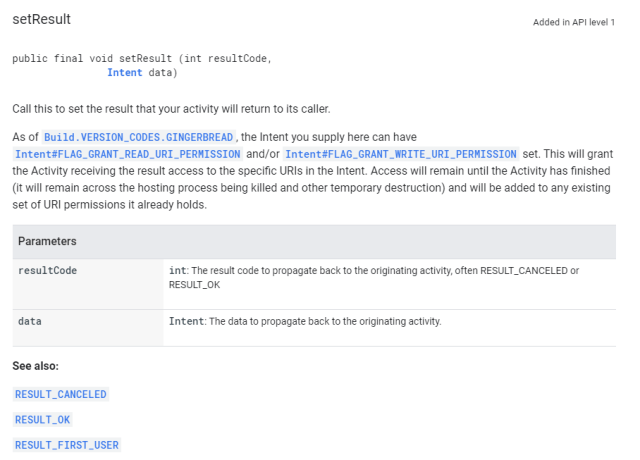
- Activity2 => setResult() and finish current activity
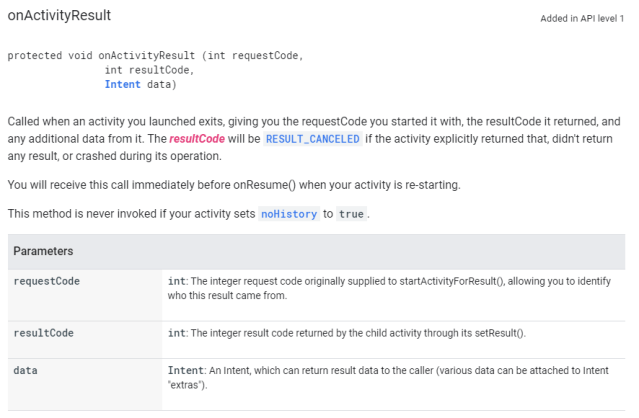
- Activity1 => get the result from Activity2 by overriding onActivityResult()
The response codes are defined by the Activity class, and can be
RESULT_OK: The request was successful.RESULT_CANCELED: The user canceled the operation.RESULT_FIRST_USER: For defining your own result codes.
Official documentation:
Demo:

Code sample:
| public class Activity1 extends AppCompatActivity { | |
| public static final int REQUEST_CODE = 255; | |
| @Override | |
| protected void onCreate(Bundle savedInstanceState) { | |
| super.onCreate(savedInstanceState); | |
| setContentView(R.layout.activity_1); | |
| } | |
| public void sendMessageToActivityOnClick(View view) { | |
| Intent intent = new Intent(Activity1.this, Activity2.class); | |
| intent.putExtra(MESSAGE, "Are you there?"); | |
| startActivityForResult(intent, REQUEST_CODE); | |
| } | |
| @Override | |
| protected void onActivityResult(int requestCode, int resultCode, @Nullable Intent data) { | |
| super.onActivityResult(requestCode, resultCode, data); | |
| if (requestCode == REQUEST_CODE && resultCode == RESULT_OK) { | |
| String resultFromActivity2 = data.getStringExtra(RESULT); | |
| // use the result | |
| } | |
| } | |
| } |
| public class Activity2 extends AppCompatActivity { | |
| public static final String RESULT = "result"; | |
| @Override | |
| protected void onCreate(Bundle savedInstanceState) { | |
| super.onCreate(savedInstanceState); | |
| setContentView(R.layout.activity_2); | |
| Bundle bundle = getIntent().getExtras(); | |
| if (bundle != null) { | |
| String messageFromActivity = bundle.getString(MESSAGE); | |
| if (messageFromActivity != null && messageFromActivity.length() >= 3) { | |
| String response = "Yes, I'm here"; | |
| Intent intent = new Intent(); | |
| intent.putExtra(RESULT, response); | |
| setResult(RESULT_OK, intent); | |
| finish(); | |
| } | |
| } | |
| } | |
| } |
Intent
- An Intent is a messaging object you can use to request an action from another app component.
- Although intents facilitate communication between components in several ways.
Intent types
Explicit Intent
Starts a specific activity: an activity created by the developer
| Intent launchSecondActivity = new Intent(AboutIntentsActivity.this, SecondActivity.class); | |
| startActivity(launchSecondActivity); |
Implicit Intent
Asks system to find an activity that can handle the request: an activity created in the system (call, share, display a website, etc)
| public static final String TAG = "ImplicitIntentsActivity"; | |
| public void openUrlInBrowser(String url) { | |
| // Parse the URI and create the intent | |
| Uri website = Uri.parse(url); | |
| Intent intent = new Intent(Intent.ACTION_VIEW, website); | |
| // Find an activity to hand the intent and start that activity | |
| if (intent.resolveActivity(getPackageManager()) != null) { | |
| startActivity(intent); | |
| } else { | |
| Log.e(TAG, getResources().getString(R.string.can_not_handle_open_url)); | |
| } | |
| } | |
| public void openLocationInMaps(String location) { | |
| // Parse the location and create the intent. | |
| Uri addressUri = Uri.parse("geo:0,0?q=" + location); | |
| Intent intent = new Intent(Intent.ACTION_VIEW, addressUri); | |
| // Find an activity to handle the intent, and start that activity. | |
| if (intent.resolveActivity(getPackageManager()) != null) { | |
| startActivity(intent); | |
| } else { | |
| Log.e(TAG, getResources().getString(R.string.can_not_handle_open_location)); | |
| } | |
| } |
Bundle
Used to transfer data using Intent.
| // send data | |
| String message = "just a text"; | |
| Intent lunchReceiveTextActivity = new Intent(BundleSampleActivity.this, ReceiveTextActivity.class); | |
| lunchReceiveTextActivity.putExtra(BundleSampleActivity.TEXT, message); | |
| startActivity(lunchReceiveTextActivity); | |
| // get data | |
| Bundle bundle = getIntent().getExtras(); | |
| if(bundle != null) { | |
| String message = intent.getStringExtra(SendTextActivity.CAROL); | |
| if (!message.isEmpty()) { | |
| // use the received message | |
| } | |
| } |


Thanks for putting this article together with such a nice visual and code samples. I’m sure it helps many people understand those concepts better.
LikeLiked by 2 people